
Track Attendance.Manage Shifts.Run Your Team — Effortlessly.
Veproks replaces paper timesheets, manual tracking, and spreadsheets with one connected system: GPS-verified QR check-in, shift scheduling, task management, leave tracking, and payroll — built for teams spread across multiple locations, from retail chains to production floors to field crews.
Everything your workforce needs in one place.
From QR code check-ins to shift scheduling, tasks, leave, and payroll — Veproks connects your managers, employees, and every location in real time. Publish a shift on the manager dashboard and it's on an employee's phone instantly; a check-in at a kiosk shows up on the dashboard the same second; an approved leave request updates the schedule and flows straight into the next payroll run — no exports, no re-entering the same data twice.
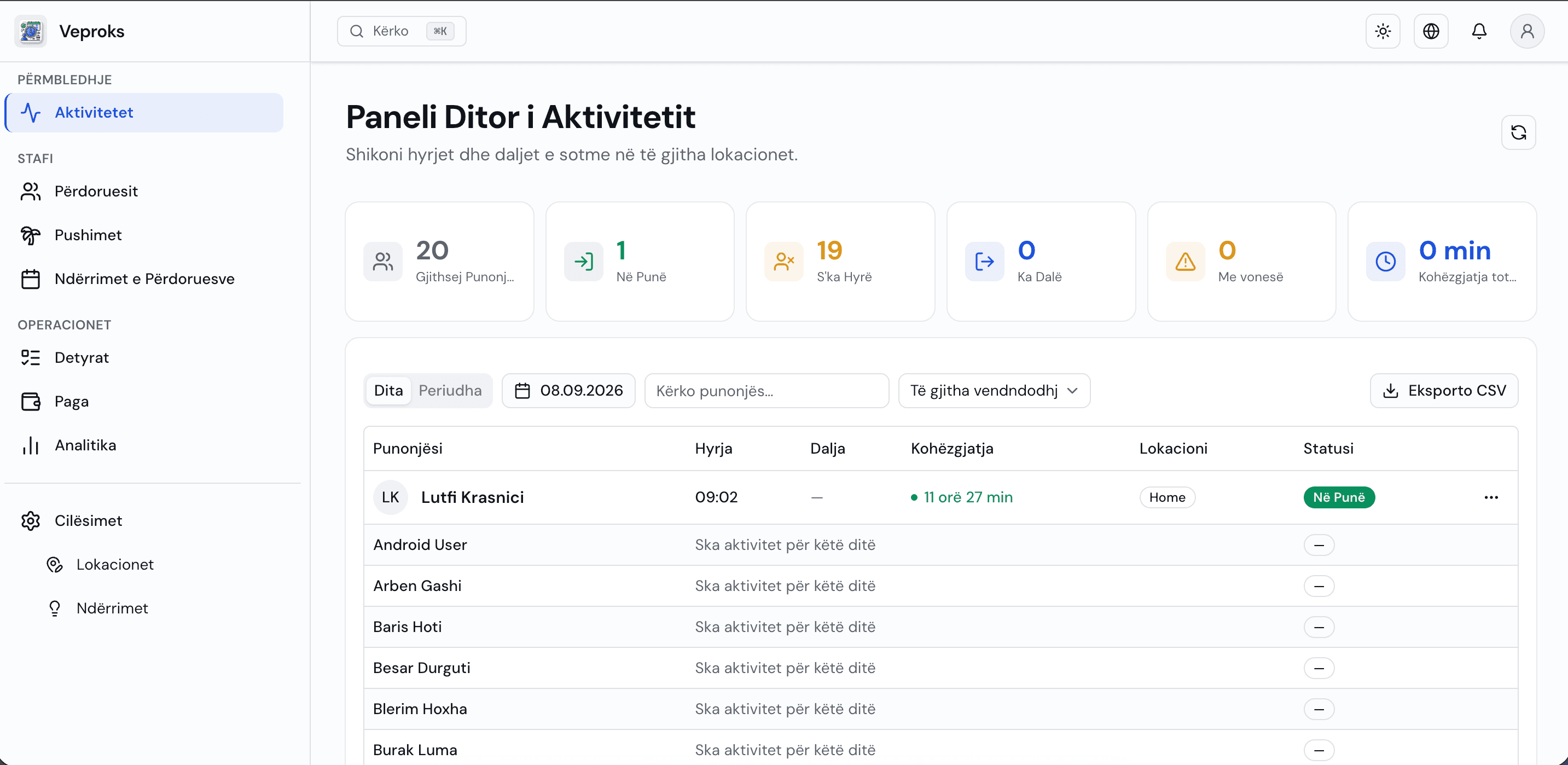
Built for how your team actually works
Replace spreadsheets and guesswork with a platform that handles attendance, tasks, shifts, and leave — all in one place.
QR Code Check-In
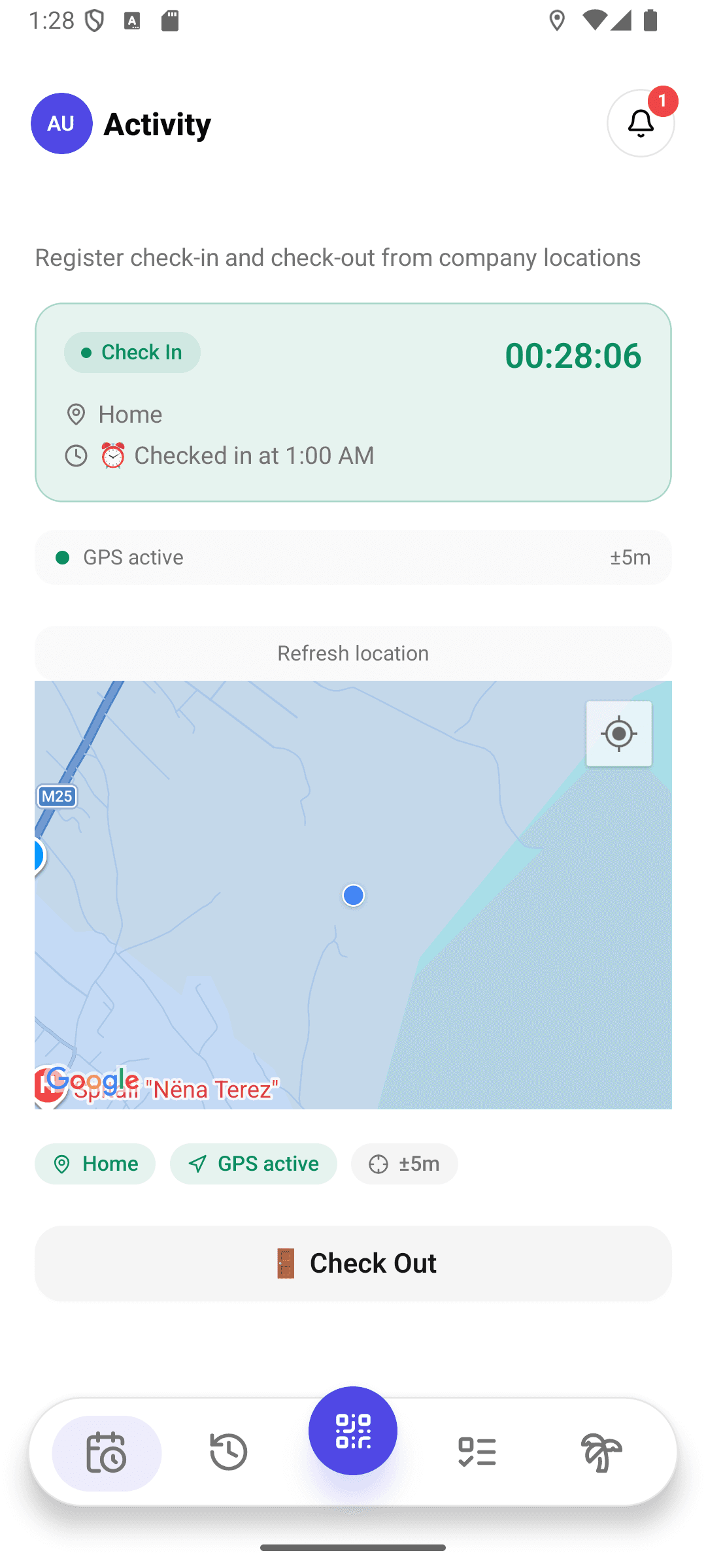
Employees scan the QR code shown on the screen at the entrance with their phone and check in or out in seconds. No extra hardware, card reader, or fingerprint device to buy — the screen app runs on any tablet or monitor. The code rotates on a regular interval, so a screenshot can't be shared to fake a check-in.
GPS Verification
Every QR scan is checked against the geofence radius defined for that location using the phone's GPS. If the employee is far from the site, the check-in is rejected — making it practically impossible for someone to clock in on a colleague's behalf ('buddy punching'). You set the radius per location — a few meters for a small store, a wider area for an open site.
Manager Dashboard
Who showed up, who was late, which task is at what stage — see it all on one screen, in real time. Assign tasks, plan shifts, approve leave requests, and export reports as PDF right from the dashboard. It runs in any browser and installs like an app on your desktop or home screen — no separate setup required.
Branch-Level Manager Access
If you run multiple branches, assign each one its own manager — that manager sees only their branch's employees, attendance records, and tasks, with no access to other branches' data. A company-wide manager keeps monitoring every location from one dashboard, unaffected. Assigning a manager to a newly opened branch takes a few clicks.
Shift Scheduling
Build your weekly or monthly shift plan on a drag-and-drop calendar, save any week as a reusable named template, and publish the schedule to the team with one click. Scheduled shifts are automatically matched against attendance in a dedicated compliance view that marks each shift on-time, late, no-show, early-leave, overtime, or unscheduled — so coverage gaps and patterns show up before payroll, not after.
Task Management
Assign a task to one or several employees, set a due date, and track progress on a drag-and-drop kanban board. Break larger tasks into a checklist employees tick off one item at a time, and attach reference photos or documents so instructions travel with the work. Require photo proof before a task is marked complete, so you know the work actually got done. Comments and status updates are kept in the task history, so who did what and when is always visible after the fact.
Payroll & Advances
Run monthly or hourly payroll automatically synced with the attendance and shift data already in the system — no manually adding up hours worked. Overtime, salary advances with repayment installments, one-off manual adjustment lines for corrections or stipends, and tax for the country you operate in are all calculated automatically alongside any bonus or commission lines applied from a bulk import. Every run moves through draft, approval, and paid stages — once approved, the numbers are locked — and each employee gets a detailed payslip breakdown as a downloadable PDF.
Employee Mobile App
Beyond QR check-in, employees view and complete tasks assigned to them, request leave or shift swaps, and receive instant notifications from their manager — all from one app. It's available on the App Store and Google Play.
Your team, in their pocket.
The Veproks employee app is now live on the App Store and Google Play — check-ins, shifts, and leave requests, right from their phone.
From setup to check-in in minutes
A simple 6-step process — we set your team up personally, usually the same day.
Set up your company
We create your company, add your locations with their check-in radius, and import your employee roster together on a short call.
Display app shows QR code
The kiosk display app runs on any tablet or screen at your location — no card reader or extra hardware to buy. A unique QR code is shown and rotates on a timer, so a screenshot of it can't be reused later to fake a check-in.
Employee scans with their app
Employees open the Veproks mobile app and scan the code to check in. The whole exchange — scan, GPS check, confirmation — takes less than 3 seconds.
GPS confirms location
The system checks the employee's GPS coordinates against the geofence radius you set for that location — tight for a small store, wider for an open site — rejecting the check-in if they're too far away, which prevents buddy punching.
Attendance is recorded
The check-in is instantly recorded with timestamp, location, and employee details, and matched against the scheduled shift. The manager gets a push notification in real time.
Managers track everything
The web dashboard shows live attendance, task progress, shift coverage, and analytics in one view — with drill-downs by branch, by employee, or by date range.
Built for your industry
Veproks adapts to any workplace that needs reliable attendance tracking and workforce management.
Manufacturing
Track workers across multiple production floors or shifts from a single dashboard. GPS-verified QR check-in shows instantly who's on which floor and which shift; watch overtime and absence reports in real time to plan production more accurately. Save a recurring shift pattern as a template once and reuse it every week, and let the compliance view flag no-shows or late arrivals on the floor the same day — not discovered when a production run is already behind.
Retail
Manage part-time schedules, shift-swap requests, and store-level attendance across your entire chain from one place. Assign each store its own manager — they see only their store's data, while you keep monitoring the whole chain from a single dashboard at headquarters. When a part-time employee needs to trade a shift, they send the request from their phone and a manager approves it with one tap — no group chats or paper sign-up sheets to figure out who's actually covering the floor.
Healthcare
Guarantee adequate coverage every hour with automated scheduling tools built for shift-based staff. Document working-hour compliance with verifiable proof using GPS-verified check-in/out and detailed attendance reports. The compliance view lines up every planned shift against what actually happened — on time, late, no-show, early-leave, or overtime — so a coverage gap is visible the same shift, not discovered at the end of the month.
Field Services
Define every job site as a check-in location for field teams that don't work from a fixed office. When an employee scans the QR code and confirms their GPS location from their phone, they've proven they were actually on site — building transparency and trust with remote teams. Pair that with photo-proof tasks — a technician can be required to attach a picture before a job is marked complete — so a finished job site is documented, not just reported after the fact.
The numbers speak for themselves
Reduction in manual timesheet processing
Faster payroll preparation with automated reports
Paper timesheets — completely eliminated
GPS-verified attendance — no buddy punching
Frequently asked questions
Can't find your answer? Contact our support team.